How to Choose an LLM for Reliable Booking and CRM Tool Calls
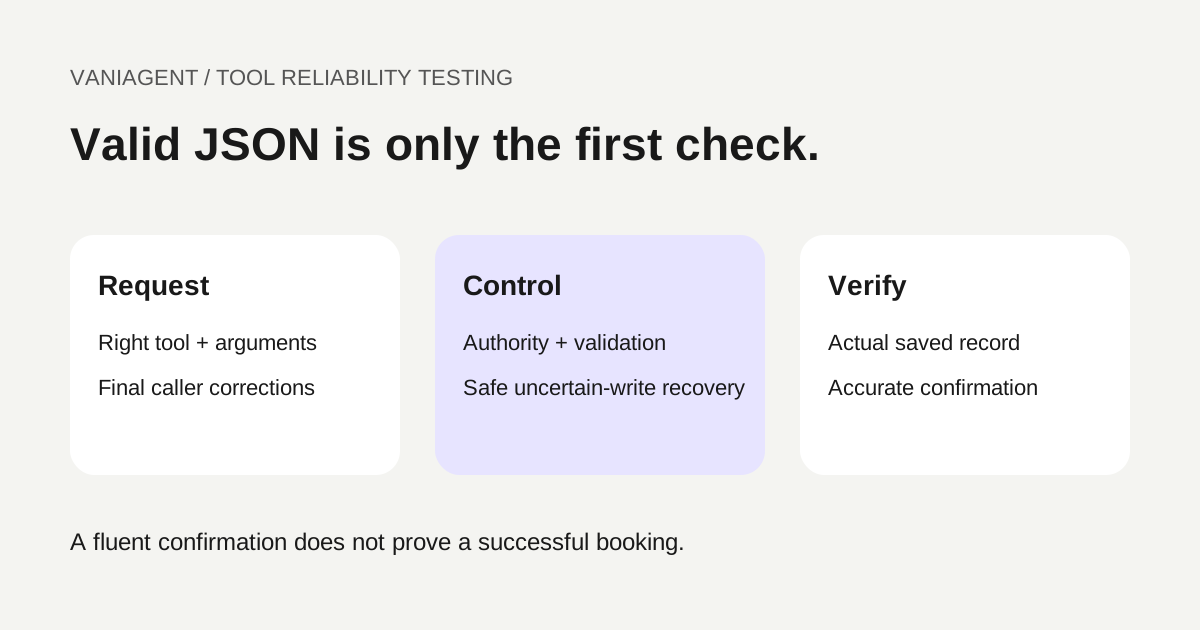
Choose an LLM for booking and CRM actions by testing what it requests and what the application actually saves. The model must choose the right tool, preserve the caller's final corrections and handle failure honestly. The application must enforce authorization, validate business fields and prevent duplicate actions.
A model that produces valid JSON can still book the wrong branch or update the wrong customer. A model that speaks confidently can still omit the tool call altogether. This guide provides a selection rubric and acceptance matrix rather than an unsupported vendor ranking.
For broad model choices, see best LLMs for AI voice agents in India. For using several models, see task-based LLM routing for phone calls. This article focuses on reliable action requests and verified outcomes.
Separate model capability from application authority
Google's function-calling guide describes model-generated function requests and arguments, with application-defined functions executed by the application. Anthropic's strict-tool-use documentation describes schema-constrained tool inputs for supported configurations. These references were checked on 16 October 2026.
Those capabilities help define an interface. They do not establish that a caller owns a record, that a chosen slot is available or that an action succeeded. Keep those checks outside generated text and apply them consistently to every candidate model.
Do not expose a generic unrestricted database-write tool for a narrow receptionist task. Offer the smallest supported actions with clear descriptions and authorization boundaries.
Define the tool contract before comparing models
Use the same business requirements and equivalent tool access for each candidate. Freeze the schema, descriptions, approved information and expected outcomes before scoring.
| Tool-contract element | Booking example | CRM example |
|---|---|---|
| Allowed operation | Request a specified appointment | Update approved contact fields |
| Identity scope | Authorized patient or customer reference | Verified record mapping |
| Required fields | Branch, service, date, time and timezone | Record reference and allowed changes |
| Preconditions | Confirmation and current resource rules | Field-level authority and current state |
| Action reference | Stable logical booking request | Stable logical update request |
| Result states | Saved, rejected or uncertain | Applied, rejected or uncertain |
Have the business owner approve which operations are permitted. Missing information should lead to clarification or a defined fallback, not a fabricated default. A model should not infer an internal calendar or customer ID from a name when the application requires a verified mapping.
Test tool selection and argument meaning separately
A call can fail before execution through the wrong tool choice, missing fields or an invented value. Score those categories separately so the result indicates what needs repair.
For example, a caller asking whether appointments are available should not automatically trigger a booking. A customer correcting their branch before confirmation should not leave the old branch in the write request. A request to change a phone number should not grant access to unrelated billing fields.
Strict schemas can constrain structure where supported, but business validation remains necessary. Check that values refer to authorized records, current services and the final confirmed caller intent. Avoid treating a high schema-pass rate as a task-success rate.
Build a held-out scenario matrix
Use fictional records with reference outcomes. Include both ordinary success and cases where the correct behaviour is to clarify, refuse an out-of-scope action or hand the request to staff.
| Scenario | Expected model behaviour | Authoritative evidence |
|---|---|---|
| Caller requests availability only | Read-only lookup, no booking write | Tool trace and unchanged calendar |
| Caller confirms a valid slot | Correct booking request | Saved branch, service and time |
| AM/PM is ambiguous | Clarify before writing | No premature write |
| Branch changes mid-call | Final branch used | Request and saved resource |
| Customer record is unverified | Follow verification or fallback | No unauthorized update |
| CRM update includes disallowed field | Avoid or reject the change | Field-level validation result |
| Tool returns definite failure | No success announcement | Response and spoken wording |
| Tool response is uncertain | Reconcile or escalate | Existing state and retry trace |
Keep tuning cases separate from final evaluation. Record configuration, test order and sample limits. If repeated runs vary, report that variation rather than choosing the most favourable attempt.
Verify the complete action chain
For each test, inspect the caller's confirmed intent, requested tool, arguments, application validation, execution result and saved state. Then compare the spoken confirmation with that state.
An action that exists is not enough: verify the correct customer, branch, date, timezone and status. For CRM writes, check that unrelated values and staff edits remain intact. Use the CRM integration guide for the record chain.
Record incomplete evidence as unresolved. A transcript saying “done” or a connector returning a generic success string does not establish that the intended downstream write happened.
Handle uncertain writes without duplicate actions
Suppose the scheduling service saves an appointment but its response is lost. The application sees a timeout while the calendar already contains the event. A second model or retry must not create another appointment blindly.
Use a supported idempotency mechanism or action-reference lookup where available. If the backend cannot establish the outcome, route the uncertain case to the approved recovery process. Do not promise exactly-once execution from a prompt instruction alone.
Test definite success, definite rejection and uncertain result separately. Use the double-booking prevention guide for resource collisions and recovery. Business-action state should outlive an individual model request.
Test caller corrections and interruption timing
An early tool proposal can become obsolete when the caller says “actually, Thursday” or changes the location. The workflow must establish which action is still authorized and prevent an older response from executing afterward.
Test corrections before submission, during a read-back and after a write has completed. The last case requires the approved rescheduling or update process rather than pretending the initial write never happened.
For Hindi and Hinglish phone workflows, include reviewed human audio, negation, spoken numbers and local names. Text-only tests isolate model reasoning; telephone tests add recognition, turn control and playback. Use the Hindi task-accuracy method to keep those layers distinct.
Score failures by consequence, not just average accuracy
Use mandatory gates for unauthorized writes, duplicate actions and false success confirmations. A model should not offset a consequential failure with many easy FAQ passes.
| Score dimension | What to report |
|---|---|
| Tool choice | Correct operation or appropriate no-action decision |
| Arguments | Schema validity and business-field correctness separately |
| Clarification | Needed questions asked before action |
| Authorization | Out-of-scope requests blocked |
| Recovery | Definite and uncertain outcomes handled correctly |
| Saved result | Verified intended record with no unintended changes |
| Spoken result | Confirmation agrees with the actual state |
For a fictional evaluation of 60 scenarios, suppose 50 require a successful write and ten require a blocked or clarification outcome. If 47 of the 50 writes succeed and all ten no-write cases behave correctly, report both denominators. Do not call all three remaining write cases safe merely because no exception appeared in application logs.
The result is an illustrative scoring method, not a measured model benchmark. Include unresolved cases and repeated-run variation.
Measure latency and cost on the same workload
Separate time to a brief acknowledgement from time to the verified action and final audible confirmation. Tool latency can dominate a turn even when model generation is fast. Report distributions, not just one best-case timing.
Use the latency measurement guide. Compare models with the same tool environment and disclose any differences in context, caching or execution location.
Include retries, failed requests and staff recovery in cost. A lower generation rate is not automatically a lower cost per correctly completed task. Keep carrier, speech, recording and model components distinct so bundled charges are not duplicated.
Review compatibility and data handling
Check the chosen interface's supported schema features, tool-response format, history requirements and concurrency behaviour. Do not assume two models using similar JSON accept the same lifecycle or native-audio transitions.
Map the context and tool results sent to each provider using the data-flow review template. Returned CRM objects can contain unnecessary fields; minimize them before adding them to model context.
Version the tool contract and revalidate on model or prompt updates. An available new model should enter the test suite before it replaces a working production route.
Make the release decision reviewable
Keep a short decision record with the candidates, versions, allowed tools, scenario set, outcome counts, consequential failures, latency, cost and remaining limits. Choose only among configurations that satisfy the required action safeguards.
Run a limited approved pilot with fictional testing completed first, an operational fallback and a defined monitoring owner. Use the hallucination monitoring guide to inspect action claims against authoritative records after launch.
The useful model choice is the one that reliably supports the business workflow within its controls. Function-call support is the starting capability; correct, authorized and verified actions are the acceptance result.
Frequently asked questions
How should I choose an LLM for booking and CRM tool calls?
Compare eligible models on the same tool contracts and held-out scenarios. Score correct tool choice, arguments, clarification, authorization handling, failure recovery and verified saved results, then compare caller-facing latency and complete cost.
Does schema-valid JSON prove a booking is correct?
No. Well-formed arguments can still contain the wrong branch, customer or date. Validate business meaning, authorization and current availability in the application before writing.
Should the model execute CRM changes directly?
For application-defined tools, keep execution and authorization controlled by the application. Treat the model’s tool request as a proposal that must pass the approved checks, rather than as permission to make any requested change.
What happens when a booking response times out?
Treat the write result as uncertain until reconciled. Check for the existing action using supported identifiers or duplicate-prevention controls before retrying. Do not announce failure or success solely from the timeout.
Can I test tool calling with text before using telephone audio?
Yes. Text tests help isolate tool reasoning, but they do not establish telephone performance. Add the intended audio route, Hindi/Hinglish corrections where relevant, interruptions and playback to the end-to-end evaluation.
Which LLM is best for all CRM workflows?
No universal ranking follows from public tool-support documentation. Select from measured performance on your authorized workflows and revalidate the exact model version, prompt and integration after changes.
Scope your tool-reliability evaluation
Bring your approved actions, tool contracts and fictional scenario set to a scoped VaniAgent demonstration. Verify saved records and recovery paths before relying on a model's tool-support claim.
Put these ideas into production
Deploy AI voice agents in minutes and build outbound, inbound, and follow-up workflows on one platform.
Related Articles
Which LLM Is Best for AI Voice Agents in India?
Compare GPT, Gemini, Claude, and open models for AI voice agents in India. Learn how to choose models for latency, Hindi and Hinglish, tool calling, cost, reliability, and production routing.
One Model or Several? Routing LLMs for Different AI Phone-Call Tasks
Evaluate LLM routing for AI phone tasks with model eligibility, context safeguards, safe fallback, a worked cost example and acceptance tests.
How Do AI Voice Agents Integrate With CRM Systems?
Learn how AI voice agents integrate with CRM systems like HubSpot and Salesforce, what fields to sync, how call summaries work, and what workflow automations to test before launch.
How Does AI Book Appointments Without Double-Booking?
Design reliable AI appointment booking with current availability, exclusive reservations, idempotent retries and a runnable calendar-conflict demonstration.