How Do AI Voice Agents Integrate With CRM Systems?
How Do AI Voice Agents Integrate With CRM Systems?
Short answer: AI voice agents integrate with CRM systems by reading customer context before a call, capturing structured information during the call, writing call outcomes back to CRM fields, attaching summaries or transcript links, assigning owners, and triggering follow-up workflows.
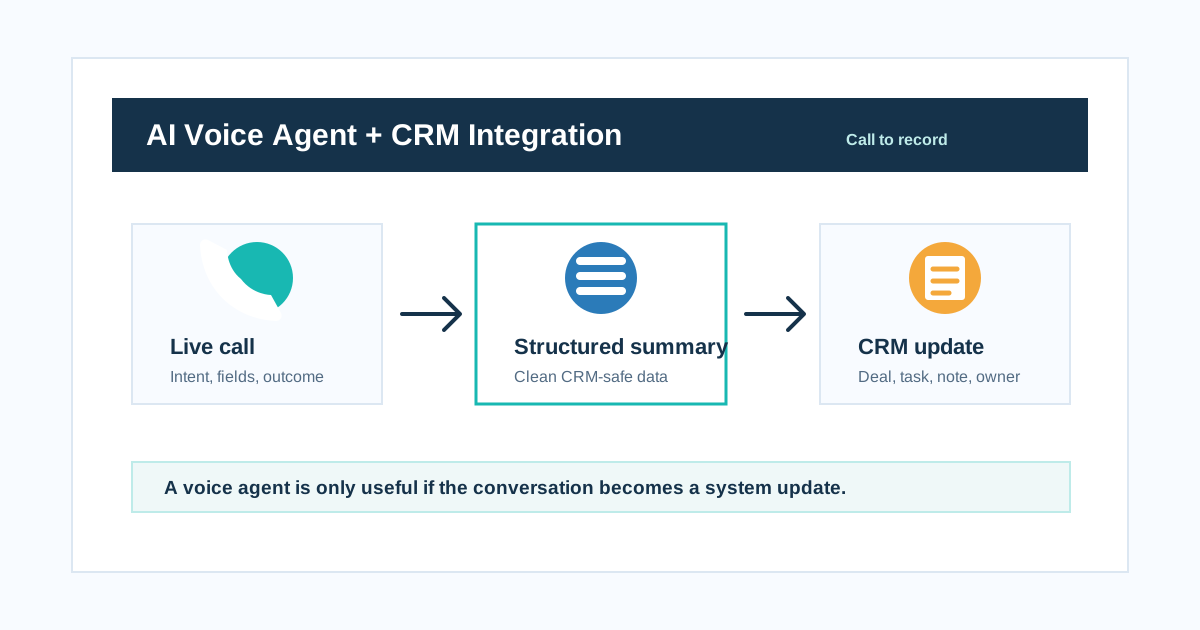
A voice agent is only useful if the conversation becomes a system update.
That is the line to remember.
An AI voice agent that can talk beautifully but does not update the CRM is just a smarter answering machine. The real value appears when the call changes the business system: lead stage updated, appointment booked, callback created, ticket opened, owner assigned, WhatsApp follow-up sent, payment reminder logged, or next task created.
The call is the conversation. The CRM is the memory.
What CRM integration really means
CRM integration is not only "send transcript to HubSpot" or "log a call in Salesforce."
Real integration means the AI voice agent can move useful data between the call and the business workflow.
| Integration layer | What happens |
|---|---|
| Pre-call context | AI reads contact, deal, ticket, campaign, or appointment data |
| Live call capture | AI captures intent, fields, answers, objections, and next steps |
| Tool action | AI books, updates, creates, routes, or triggers a workflow |
| Post-call writeback | AI writes summary, outcome, transcript link, and structured fields |
| Automation | CRM triggers follow-up, task, WhatsApp, email, or human review |
| Reporting | Managers see outcomes by campaign, agent, source, and workflow |
Twilio describes conversational AI as combining communications channels with context and intelligence. Salesforce describes voice agents accessing real-time customer data, updating records, and triggering workflows. HubSpot's developer example shows voice AI collecting audio and transcription and storing them in HubSpot CRM.
Different vendors use different architecture. The buyer question is the same: what exactly gets read, written, and triggered?
The core line
A voice agent is only useful if the conversation becomes a system update.
If the CRM still needs manual cleanup after every AI call, the automation is incomplete.
What should the AI read before the call?
Pre-call context lets the AI avoid asking questions the business already knows.
| CRM object | Useful context |
|---|---|
| Contact | Name, phone, language, city, lifecycle stage |
| Lead | Source, campaign, product interest, qualification status |
| Deal | Stage, amount, owner, next step, close date |
| Ticket | Issue type, priority, SLA, previous notes |
| Appointment | Date, time, service, provider, status |
| Order | Order ID, delivery status, payment mode, return status |
| Account | Company, plan, renewal date, account manager |
Example:
If the CRM already knows the customer asked for a demo, the AI should not start with "How can I help you?" It should say something like:
"Hi Rahul, I am calling about your demo request for AI calling automation. Is this a good time?"
Context makes the call feel less cold.
What should the AI capture during the call?
The AI should capture structured fields, not just a transcript.
| Workflow | Fields to capture |
|---|---|
| Sales qualification | Industry, team size, monthly call volume, timeline, budget, use case |
| Appointment booking | Name, service, preferred date, preferred time, confirmation status |
| Ecommerce support | Order ID, issue type, resolution, return/refund intent |
| BFSI reminder | Customer response, payment intent, callback time, dispute flag |
| Real estate lead | Budget, location, project interest, site visit preference |
| EdTech admissions | Course, class, exam target, parent/student, counselling time |
| Support ticket | Issue category, severity, affected product, next action |
Long transcripts are useful for review. Structured fields are useful for work.
What should the AI write back to CRM?
At minimum:
| CRM field | Why it matters |
|---|---|
| Call outcome | Connected, no answer, not interested, booked, transferred |
| Intent | Why the caller engaged |
| Summary | Human-readable call result |
| Next action | What should happen next |
| Owner | Who is responsible |
| Follow-up time | When to call or message again |
| Qualification status | Qualified, unqualified, needs review |
| Lead/deal stage | Pipeline movement |
| Tags | Campaign, language, sentiment, objection |
| Transcript link | Evidence and QA |
| Recording link | Review if needed |
| Tool result | Booking ID, ticket ID, payment link status |
The CRM should answer: what happened, why it happened, who owns it, and what happens next?
HubSpot CRM integration pattern
For HubSpot-style workflows, think in contact, company, deal, ticket, activity, and workflow terms.
| AI call event | HubSpot action |
|---|---|
| New inbound call | Create or update contact |
| Lead qualified | Update lifecycle stage |
| Demo booked | Create meeting or task |
| Call completed | Log call activity |
| Transcript ready | Attach transcript URL or note |
| Support request | Create ticket |
| Follow-up needed | Create task and assign owner |
| Not interested | Update lead status |
| Wrong number | Mark bad phone number |
HubSpot's marketplace includes calling apps that log calls, texts, recordings, and AI voice activity into HubSpot properties. The practical buying point: look for bidirectional sync and workflow triggers, not only a call log.
Salesforce CRM integration pattern
For Salesforce, think in lead, contact, account, opportunity, case, task, event, and omni-channel routing terms.
| AI call event | Salesforce action |
|---|---|
| Lead reached | Update Lead Status |
| Prospect qualified | Create or update Opportunity |
| Customer issue | Create Case |
| Follow-up needed | Create Task |
| Call transferred | Route to owner or queue |
| Sentiment negative | Flag for manager review |
| High-value buyer | Assign to sales rep |
| Appointment booked | Create Event |
Salesforce positions Agentforce Voice as using CRM and backend system data to personalize service and trigger workflows. The lesson for any CRM: the AI must operate inside the same customer record your humans use.
Field mapping table
Before implementation, create a field mapping table.
| AI output | CRM object | CRM field | Validation |
|---|---|---|---|
| Call summary | Contact activity | Notes | Required |
| Call outcome | Contact/deal | Last call outcome | Must match allowed values |
| Lead score | Lead | AI qualification score | Number 0-100 |
| Product interest | Lead/deal | Product | Picklist |
| Follow-up time | Task | Due date | Valid date/time |
| Owner | Lead/task | Owner ID | Existing CRM user |
| Language | Contact | Preferred language | Picklist |
| Sentiment | Activity | Sentiment | Positive/neutral/negative |
| Recording URL | Activity | Recording link | Secure URL |
| Transcript URL | Activity | Transcript link | Secure URL |
This table prevents messy CRM data.
Do not write everything directly
Not every AI-captured field should instantly update the CRM.
Use risk levels.
| Update type | Write policy |
|---|---|
| Call summary | Auto-write |
| Call outcome | Auto-write with allowed values |
| Follow-up task | Auto-create |
| Lead qualification | Auto-write or review depending on workflow |
| Deal stage change | Confirm or route for review |
| Cancellation | Confirm identity and policy |
| Payment status | Tool-verified only |
| Compliance-sensitive note | Restrict and review |
| Medical/financial advice | Do not create as AI conclusion |
CRM integration should be useful and controlled.
Workflow automations after the call
Once CRM fields are updated, workflows can run.
| Trigger | Automation |
|---|---|
| Demo booked | Send calendar invite and WhatsApp confirmation |
| Lead qualified | Notify sales owner |
| No answer | Retry after defined delay |
| Not interested | Stop campaign or nurture later |
| Complaint detected | Create high-priority ticket |
| Payment intent positive | Send payment link |
| Appointment confirmed | Send reminder |
| Human transfer | Send transcript summary to rep |
| Hindi caller | Assign Hindi-speaking owner |
| High-value deal | Alert manager |
This is where AI voice becomes revenue operations, not only call handling.
Common CRM integration mistakes
Avoid these.
| Mistake | Result |
|---|---|
| Saving only transcript | Humans still do manual reading |
| No field mapping | CRM becomes inconsistent |
| No duplicate handling | Same caller creates multiple contacts |
| No owner assignment | Follow-up falls through |
| No failed-API fallback | Call succeeds but CRM misses update |
| No allowed values | AI writes messy free text into picklists |
| No confirmation rules | Wrong booking or stage updates |
| No audit log | Hard to investigate bad updates |
| No sync monitoring | Silent failures accumulate |
| No workflow tests | Automation fires incorrectly |
The goal is not to dump call data into CRM. The goal is clean operational memory.
How to handle duplicate contacts
Duplicate handling matters in India because customers may call from alternate numbers, family numbers, branch numbers, or WhatsApp numbers.
Match in this order when possible:
- Verified customer ID
- Phone number
- WhatsApp number
- Order ID or ticket ID
- Name plus city or pincode
If uncertain, create a review task instead of merging aggressively.
What happens when CRM update fails?
Every integration needs failure handling.
| Failure | Safe behavior |
|---|---|
| CRM API down | Store pending update and retry |
| Field validation fails | Save summary and flag integration error |
| Duplicate found | Route to review |
| Owner missing | Assign default queue |
| Tool timeout | Tell caller the team will follow up |
| Recording upload fails | Save transcript and retry media upload |
An AI voice agent should never say an update happened if the tool failed.
Testing checklist
Before launch, test:
- New contact creation
- Existing contact update
- Duplicate contact handling
- Deal or lead stage update
- Task creation
- Owner assignment
- Transcript link logging
- Recording link logging
- Workflow trigger firing
- Failed API retry
- Invalid field value rejection
- Human transfer summary
- WhatsApp follow-up trigger
- No-answer outcome
- Not-interested opt-out status
Use real CRM sandbox data, not only a demo contact.
India-specific CRM integration fields
For Indian businesses, add fields like:
- Preferred language
- City or region
- Pincode
- Campaign source
- WhatsApp opt-in status
- DND/consent status
- Lead source partner
- Branch or franchise
- Payment mode preference
- Callback window
- Relationship manager
- Hindi/Hinglish transcript quality flag
These fields often decide whether follow-up actually happens.
The buyer checklist
Ask your AI voice vendor:
- Which CRMs do you support natively?
- Can you integrate through API or webhook?
- Can the AI read customer context before the call?
- Can it update structured CRM fields after the call?
- Can it attach transcript and recording links?
- Can it create tasks, tickets, deals, meetings, or callbacks?
- Can it trigger WhatsApp or email workflows?
- Can it handle duplicates?
- Can it retry failed updates?
- Can field updates be approved before writeback?
- Can managers audit what the AI changed?
- Can you map fields differently by campaign?
If the answer is only "we send a transcript," keep asking.
FAQ
How do AI voice agents integrate with CRM systems?
They read customer context, capture call data, create structured summaries, update CRM fields, attach transcript or recording links, assign owners, create tasks or tickets, and trigger follow-up workflows.
What CRM fields should an AI voice agent update?
Common fields include call outcome, intent, summary, next action, lead stage, qualification status, appointment time, callback time, owner, language, sentiment, product interest, transcript link, and recording link.
Can AI voice agents work with HubSpot or Salesforce?
Yes. AI voice agents can integrate with HubSpot, Salesforce, and other CRMs using native apps, APIs, webhooks, CTI integrations, middleware, or automation tools.
Should an AI voice agent write directly into CRM?
Yes for low-risk updates such as summaries and tasks. For high-impact updates such as deal stage changes, payment status, cancellation, or regulated notes, use confirmation, validation, and review rules.
What is the biggest CRM integration mistake with AI calls?
The biggest mistake is saving only the transcript. Teams need structured fields, mapped outcomes, ownership, next action, automation triggers, and sync monitoring.
How do you test AI voice agent CRM integration?
Test field mapping, duplicate handling, owner assignment, workflow triggers, transcript links, failed API calls, invalid values, human handoff summaries, and sandbox-to-production behavior.
Final answer
AI voice agent CRM integration is not about storing audio. It is about turning conversations into clean business actions.
The agent should read context, capture structured fields, update CRM records, create next steps, and trigger workflows that humans can trust.
A voice agent is only useful if the conversation becomes a system update.
Related reading: What AI voice agent metrics should you track after launch?, When should an AI voice agent transfer to a human?, How do you test an AI voice agent before it goes live?, and Is your AI voice agent secure enough for customer calls?.
Practical worksheets and implementation guides
- AI Voice Agent With Google Sheets: Leads, Call Results and Sync Errors
- How to Stop Duplicate Follow-Up Calls From Your CRM
- AI Voice Agent With Zoho CRM: Leads, Call Logs and Follow-Up Tasks
- AI Voice Agent With HubSpot: Contact Updates and Meeting Handoffs
- AI Call Webhooks: Save Reliable Outcomes When Retries or Timeouts Occur
- AI Voice-Agent CRM Reconciliation: Find Missing Calls and Follow-Up Tasks
For field policies and outbound payload checks, read removing sensitive data from AI call transcripts before CRM sync.
Put these ideas into production
Deploy AI voice agents in minutes and build outbound, inbound, and follow-up workflows on one platform.
Related Articles
What AI Voice Agent Metrics Should You Track After Launch?
Learn the AI voice agent metrics that matter after launch: task completion, containment, latency, transfer rate, tool-call accuracy, sentiment, cost per resolved call, and failure reasons.
When Should an AI Voice Agent Transfer to a Human?
Learn when an AI voice agent should transfer to a human, how cold transfer, warm transfer, smart routing, and context handoff work, and what Indian businesses should test before launch.
How Do You Test an AI Voice Agent Before It Goes Live?
A practical AI voice agent testing checklist for teams preparing to launch real customer calls. Learn how to test latency, Hindi and Hinglish conversations, interruptions, tool calls, handoff, and production readiness.
Is Your AI Voice Agent Secure Enough for Customer Calls?
Use this AI voice agent security checklist to protect call recordings, transcripts, customer data, tool access, prompt injection surfaces, retention policies, and audit logs.
How to Remove Sensitive Data From AI Call Transcripts Before CRM Sync
Design transcript redaction before CRM sync with field allowlists, sensitive-data checks, Hindi test cases, safe retries and outbound-payload validation.