Why Did the WhatsApp Follow-Up Fail After an AI Call?
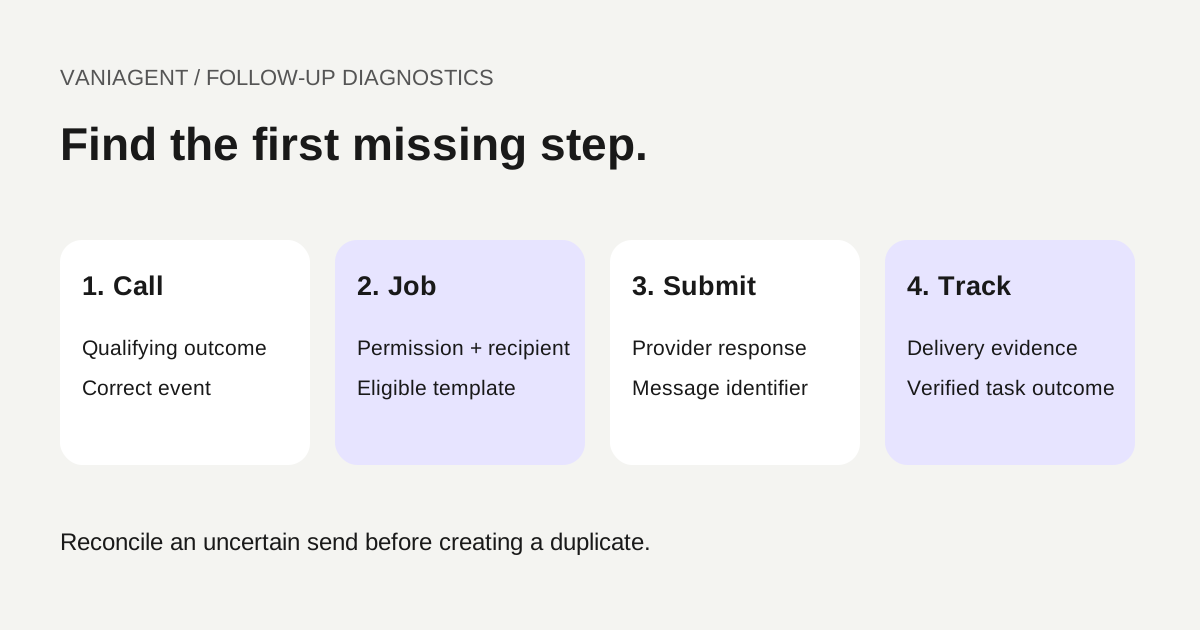
Troubleshoot a failed WhatsApp follow-up by finding the first broken link between the AI call and the customer task. Confirm the call qualified for follow-up, a permitted message job existed, the provider accepted it and delivery status was recorded. Do not start by repeatedly pressing send.
A phone call can succeed while a downstream trigger, template or recipient check fails. A message can also be delivered while the CRM still shows a stale status. Those are different problems and need different fixes.
This guide provides an operational diagnostic checklist and fictional failure scenarios. It does not diagnose a specific VaniAgent account or claim its integration supports every recovery control described here. For the shared-record design, see keeping customer context from phone to WhatsApp.
Follow the evidence chain
| Stage | Evidence to find | If it is missing |
|---|---|---|
| Qualifying interaction | Call reference, actual outcome and follow-up condition | Inspect the event and scope rule |
| Permission and destination | Approved purpose and confirmed WhatsApp recipient | Stop and resolve eligibility |
| Follow-up job | Job ID, template choice and state | Inspect trigger handling or queue creation |
| Provider submission | Request result and message identifier | Inspect credentials, sender and validation errors |
| Delivery tracking | Status events or reconciled provider record | Inspect callback processing and provider state |
| Business completion | Customer response and verified action result | Continue the task rather than marking it complete |
Use one interaction as the starting point. Record its identifiers and timestamps before changing configuration. Avoid testing by messaging an entire customer list: one controlled, permitted case is enough to identify where the chain first breaks.
Step 1: verify what the call actually triggered
Check whether follow-up is intended after every ended call, only after a confirmed request or only after a particular saved outcome. An ended call can include no answer, voicemail or a customer declining further contact.
Inspect the event received by the integration and the rule applied to it. If the qualifying outcome arrives through later analysis, a workflow listening only to the first call-ended event may never see it. That is a hypothesis to test against event records, not a reason to add a second unconditional send trigger.
Keep one logical follow-up per approved task. Duplicate event delivery should not create multiple message jobs. If both a call-ended handler and a post-call handler can send, document which owns the decision and how duplicates are prevented.
Step 2: check the recipient and permitted purpose
Confirm the destination the customer requested rather than assuming the caller ID is their WhatsApp number. Shared phones, landlines and alternate numbers need the business's approved verification process.
Inspect permission scope and withdrawal state at the time of sending. A delayed queue must not send after the customer has opted out or the purpose has expired. Do not resolve an invalid recipient by guessing a nearby number or removing digits until a request succeeds.
Keep actual customer numbers out of public bug reports and screenshots. Use masked identifiers in an incident summary while retaining authorized internal evidence.
Step 3: check the messaging window and template
Twilio's WhatsApp key concepts describe the customer service window following a customer WhatsApp message. A normal phone call does not open that window. Spoken agreement to receive a follow-up is also not the same event as an incoming WhatsApp message.
Verify the window when the message is submitted, not only when the call ends. A delayed follow-up can cross a boundary. Where a template is required, check its approved status, sender availability, language and expected variables.
Keep message purpose consistent with the approved template. Do not insert unrelated marketing into a routine appointment update or switch content types simply to bypass a rejection. Review current supplier and platform rules for the configured route.
Step 4: read the actual provider error
The following are provider-specific examples, checked on 16 October 2026. Other suppliers can expose different codes and meanings.
| Twilio reference | Documented signal | What to investigate |
|---|---|---|
| 63016 | Outside messaging window or ineligible initiating content | Window, approved template and content type |
| 63024 | Invalid WhatsApp recipient or recipient-side restriction | Confirmed destination and provider detail |
| Immediate request validation error | Request rejected before a usable message submission | Actual API response, sender and required fields |
Do not infer that every 63024 result proves the customer blocked the business. Use the provider's current error detail and supported investigation path. Likewise, do not treat every failure as a template issue if the job never reached the provider.
Preserve the error code, request time, sender reference and message identifier where one exists. Avoid storing authorization tokens or unnecessarily retaining full sensitive message bodies in diagnostic logs.
Step 5: distinguish submission, delivery and response
Twilio's status-callback guide describes tracking outbound message lifecycle changes, including delivery and supported read events. Use those events as transport evidence, not as proof of a completed booking or customer acceptance.
An accepted API request is not a delivered message. A delivered message is not a customer reply. A reply is not proof that the requested backend action succeeded. Keep those states visible separately in the CRM.
If delivery status is missing, inspect the configured callback destination, endpoint availability, authentication or signature verification and handler results. A browser successfully opening the callback URL does not prove the provider's signed request is accepted and processed correctly.
Where the provider supports a message lookup, reconcile uncertain records against it through a bounded recovery process. Do not resend solely because your own dashboard has not updated.
Step 6: make retries safe
Classify the outcome before retrying: definite temporary failure, definite permanent rejection or uncertain submission. Those require different actions. A timeout may occur after the provider accepted the message, so an immediate new send can duplicate it.
Use a stable logical job reference and retain any provider message ID before advancing state. Protect job creation and submission from concurrent workers. If there is no reliable way to reconcile an uncertain send, keep it unresolved for review rather than claiming exactly-once delivery.
For a permitted retry, recheck recipient, permission, template status and task freshness. A booking time may have changed since the original message was built. Apply a retry limit and expiry so a delayed job does not surprise the customer days later.
Three fictional incidents and their different fixes
| Observation | Evidence-based diagnosis | Appropriate correction |
|---|---|---|
| Call requested follow-up, but no job exists | Qualifying outcome was received after the handler checked | Correct event ownership and deduplicated job creation |
| Job exists with 63016 | Request used free-form text without an eligible window | Use the appropriate approved template under current rules |
| Customer received the message, CRM still says queued | Provider delivery event was rejected by the callback handler | Repair status ingestion and reconcile; do not send again |
These are illustrative patterns, not findings about your deployment. The useful diagnostic is the first unsupported transition in the record chain, rather than a guess based on the customer's visible symptom.
Test recovery with fictional records
- Duplicate call events create one logical follow-up.
- A customer who declines WhatsApp creates no send job.
- An expired messaging window selects a permitted template or a clear blocked state.
- A missing template variable produces a visible error rather than false success.
- A temporary provider failure follows the bounded retry rule.
- A lost send response triggers reconciliation before any resend.
- Duplicate or delayed status events do not regress a verified state incorrectly.
- A changed appointment is reflected in a delayed follow-up.
- Withdrawn permission suppresses pending retries.
- An unsupported alternate channel is not used automatically.
Use the CRM integration guide to connect the task to authoritative records. Test the configured messaging account, sender and callback path, rather than relying only on a mocked successful response.
Build an incident worksheet
| Field | Required evidence |
|---|---|
| Interaction and job IDs | Link the call to one logical follow-up |
| Trigger rule and event times | Establish whether the task qualified |
| Permission and recipient reference | Establish approved sending scope |
| Template and language | Identify what was actually submitted |
| Provider message ID and response | Separate rejected from accepted submissions |
| Status history and error | Trace delivery or uncertainty |
| Retry count and expiry | Explain recovery without hiding duplicates |
| Business action result | Show whether the customer task finished |
| Owner and next step | Keep unresolved cases actionable |
For a small workflow, a few well-linked records are more useful than a large dashboard with no message identifiers. Keep sensitive content access limited and apply the approved retention policy to diagnostic evidence.
Monitor the right funnel after the fix
Report eligible requested follow-ups, jobs created, messages submitted, delivered messages, unresolved sends and verified task completions. State the reporting period and allow for delivery-status delay. Separate correctly suppressed messages from technical failures.
Investigate drops between adjacent stages. A low job count suggests a different issue from many provider rejections or missing callbacks. For permission and context design, return to the phone-to-WhatsApp handoff guide.
The task is complete when the customer receives the permitted follow-up or the workflow reaches an honest, approved fallback. “Send request accepted” alone is not a sufficient success condition.
Frequently asked questions
Why did the WhatsApp follow-up fail after an AI call?
Locate the first missing step: qualifying call event, permitted follow-up job, provider request, accepted message, delivery or customer response. Then inspect the relevant error and configuration. A successful phone conversation does not prove a message was submitted or delivered.
Does a phone call open the WhatsApp customer service window?
No. A normal telephone call does not count as an incoming WhatsApp message. Check current messaging eligibility and use an appropriate approved template when required.
What does Twilio error 63016 mean?
Twilio documents it as an outside-messaging-window error, with guidance to use an eligible template or content type. Inspect the actual request and current provider documentation before retrying.
Should I resend a message that is stuck in sent status?
First reconcile the provider message record and callback history. Sent is not proof of delivery, but an uncertain status is also not proof of failure. A blind resend can create duplicates.
Does a delivered message mean the follow-up task succeeded?
No. Delivery establishes a transport outcome. Track customer response and any verified booking, document receipt or other business action separately.
Can I use SMS if WhatsApp fails?
Only through an approved alternative-channel process with the appropriate destination and permission. A failed WhatsApp attempt does not automatically authorize another channel or another recipient.
Review your follow-up workflow
Bring a redacted call reference, follow-up job state and provider message status to a scoped VaniAgent demonstration. Trace the first missing transition before changing automation or resending messages.
Put these ideas into production
Deploy AI voice agents in minutes and build outbound, inbound, and follow-up workflows on one platform.
Related Articles
How to Keep Customer Context When a Phone Call Continues on WhatsApp
Preserve customer context from phone calls to WhatsApp with verified identity, shared case records, messaging-window checks and reliable handoff recovery.
AI Voice Agent for WhatsApp and Phone Calls: Integration Guide
Plan an AI voice workflow across WhatsApp and regular phone calls. Learn channel options, context sharing, handoff, integrations, and how to test the complete journey before launch.
How Do AI Voice Agents Integrate With CRM Systems?
Learn how AI voice agents integrate with CRM systems like HubSpot and Salesforce, what fields to sync, how call summaries work, and what workflow automations to test before launch.
WhatsApp Business Calling vs Normal Phone Calls: What Can You Connect?
Compare WhatsApp Business Calling and normal phone calls: supported routes, PSTN restrictions, calling permission, human handoff and buyer acceptance tests.