How to Keep Customer Context When a Phone Call Continues on WhatsApp
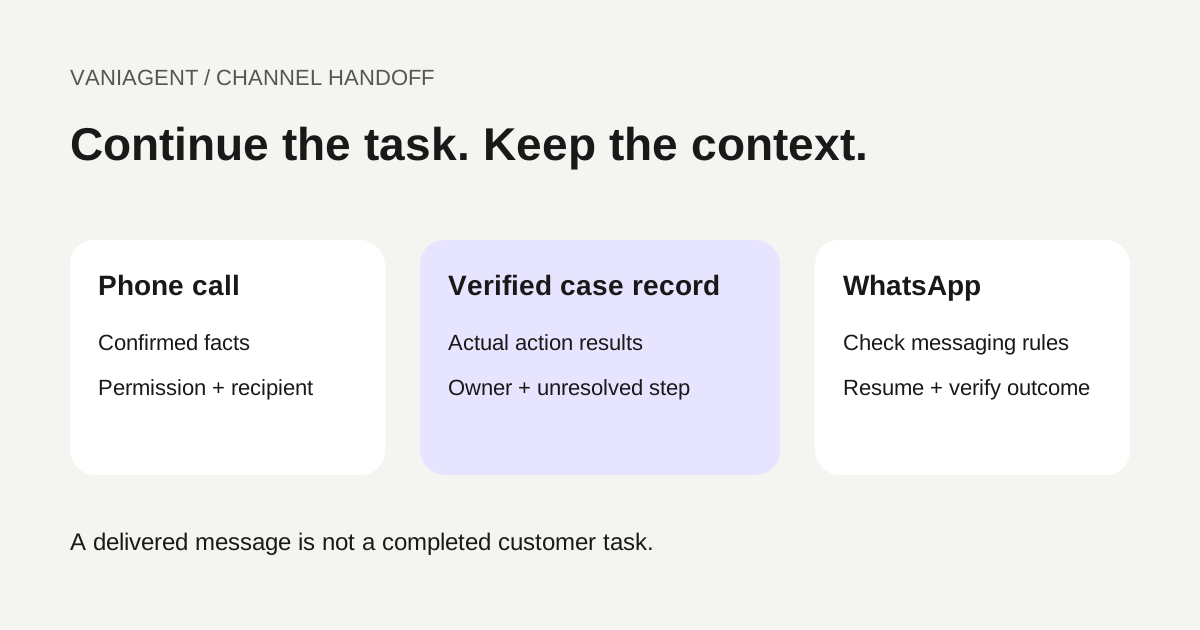
To keep customer context when a phone call continues on WhatsApp, connect both channels to the same verified case record. Save a concise call summary, the actual results of completed actions and the next unresolved step. Before sending or retrieving that context, confirm the intended recipient and apply the current WhatsApp messaging rules.
The goal is continuity: a customer should not have to repeat a branch choice or enquiry, while the agent should not mistake an earlier discussion for a completed booking. This article provides a handoff worksheet, an example conversation and tests for a proposed integration. It does not establish that a particular deployment already supports shared context.
For the wider system design, start with our WhatsApp and phone AI integration guide. Here the focus is the narrow handoff between a normal telephone conversation and a WhatsApp messaging thread, rather than a WhatsApp voice call.
Shared context needs a shared record
Using the same model or brand on both channels does not create shared memory. A voice service may have a call identifier, a messaging service has message identifiers and your CRM has customer and case identifiers. The integration must connect them deliberately.
Use a stable case identifier for the task, with links to the source call and subsequent messages. A customer may have several open enquiries, so a customer identifier alone is not always enough. Keep the case status explicit: awaiting information, awaiting approval, booked, failed or closed, for example.
If two open cases could match a new message, ask a brief clarifying question instead of loading whichever record was updated most recently. “Is this about the appointment at Baner or your billing enquiry?” may be appropriate only after the recipient is verified sufficiently to disclose those details.
Confirm the WhatsApp recipient during the call
A caller may want the follow-up on a different number, may be calling from an office landline or may share a family phone. Ask whether they want the specific follow-up on WhatsApp and confirm the destination under your approved process.
An illustrative request is: “Would you like the appointment details on WhatsApp? Which number should we use?” Read back enough of the number to resolve mistakes without unnecessarily exposing it. For sensitive information or consequential changes, use stronger verification appropriate to the business; a spoken yes alone does not prove ownership of a different number.
Store the permission scope, time, source and destination. Permission for an appointment update should not silently become permission for promotional campaigns. If the customer declines, continue through the approved phone or staff process. Never make WhatsApp mandatory simply because it is convenient for the integration.
A phone call does not open a WhatsApp messaging window
Twilio's WhatsApp key concepts describe a 24-hour customer service window following a customer's WhatsApp message, during which free-form replies are supported. A regular telephone call is not that incoming WhatsApp message. Recording permission to follow up also does not create the messaging window.
When a template is required, use an approved one appropriate to the actual purpose, language and variables. Twilio's template messaging guide explains notification messages outside the service window. Approval is not a guarantee of delivery, and a template cannot be used to bypass permission or content rules.
Check current eligibility when sending, not only when the call ends: a delayed follow-up can encounter a different window state. Confirm applicable policy and pricing with your messaging provider. This guide makes no claim that a window is free of charges.
Use this phone-to-WhatsApp handoff worksheet
The following is a proposed minimum case record. Field names are illustrative; map them to your CRM and integration rather than adding a second competing customer database.
| Field | What to preserve | Why it matters |
|---|---|---|
| Case reference | Stable identifier for this enquiry | Separates simultaneous customer tasks |
| Source call reference | Call ID and timestamp | Allows staff to review the source |
| Recipient mapping | Verified customer link and confirmed destination | Prevents context going to the wrong person |
| Permission | Purpose, channel, source and withdrawal state | Governs the permitted follow-up |
| Confirmed facts | Branch, service and stated preferences | Avoids asking the same questions again |
| Action results | Saved booking reference or explicit failure/pending state | Prevents false success claims |
| Open question | The next piece of information needed | Helps the conversation resume naturally |
| Owner | AI workflow or named staff queue | Prevents competing replies |
| Message state | Provider message ID, status and errors | Distinguishes attempted send from delivery |
| Review and expiry | Freshness and retention rules | Avoids reusing outdated context indefinitely |
Keep assertions tied to evidence. “Customer asked about 4pm” is different from “booking saved for 4pm.” Include the booking result only when the scheduling system confirms it. Do not promote an agent's conversational summary into an authoritative business record without checking the underlying action result.
Send a useful summary rather than a transcript dump
For most routine follow-ups, the customer needs the relevant next step, not every sentence of the call. A suitable summary might contain the confirmed branch, service requested, current booking status and what the customer needs to do next.
Keep medical details, payment credentials and other unnecessary sensitive information out of general messages. Store internal context with appropriate access controls, and send the minimum needed for the agreed purpose. A short reference code should not function as a password or a public link to a private transcript.
The receiving AI workflow should treat retrieved summaries as context to verify, not instructions that override its rules. Customer-provided text can contain mistakes or requests outside the workflow. Resolve changes using current business data and authorized actions.
Example: a branch enquiry continues on WhatsApp
This fictional example involves an appointment enquiry, with no booking saved during the call.
- On the phone, the customer selects the Baner branch and asks about tomorrow afternoon.
- The receptionist records the confirmed branch and notes that appointment availability has not yet been confirmed.
- The customer agrees to a WhatsApp follow-up on a verified destination. The integration checks messaging eligibility and sends the appropriate approved message.
- The customer replies: “Is 4pm still available?” The workflow links the reply to the correct case and checks current availability.
- If the customer chooses a slot, the booking workflow saves it and verifies the result before sending a confirmation.
An initial message could say: “Following your call, we can help with your appointment enquiry at the Baner branch. Reply with your preferred time so we can check availability.” The actual outgoing text must conform to the approved template when one is required; this example is not a pre-approved template.
Notice the distinction: the earlier call supplied the branch and intent, while the later availability check supplied the current options. If the customer changes branches in chat, discard stale availability and load the new branch mapping. See the multi-branch receptionist guide.
Track delivery separately from the customer decision
Twilio's outbound message status documentation describes lifecycle updates including delivery and, for supported messaging channels, read status. Use the message identifier to connect those updates to the case.
| Observed event | What it establishes | What it does not establish |
|---|---|---|
| Send request accepted | Provider accepted the request | Recipient received it |
| Delivered status | Provider reports delivery | Customer agreed or completed the task |
| Read status, where available | Provider reports a read event | Customer accepts the offer |
| Customer reply | A response arrived | Booking or another action succeeded |
| Verified booking write | Scheduling action succeeded | Customer later attended |
A missing read receipt is not proof that the customer ignored the message. Keep task status separate from transport status. Protect webhook endpoints using your provider's supported authentication or signature verification, and process duplicate events without creating duplicate actions.
Handle delayed, repeated and conflicting replies
Messaging is asynchronous. A customer can reply after the offer expires, send the same answer twice or contact staff while the AI is still handling the case.
Recheck current state before changing a booking or sending a time-sensitive offer. Use action identifiers or equivalent duplicate prevention so repeated messages do not create several appointments. If a booking response is uncertain, inspect the saved record before retrying.
Define a single active owner for the case. When a person takes over, pause automated task replies according to your handoff policy and show staff the approved summary plus outstanding action state. Staff should not need to infer whether an appointment was saved from a transcript. The human handoff guide covers the wider escalation workflow.
Recover when the WhatsApp follow-up fails
Log the provider error and distinguish a definite failure from an uncertain status. Verify the destination, sender configuration, template status, permission and current messaging eligibility before retrying. Limit retries and make them safe against duplicate sends.
If WhatsApp cannot complete the task, use an agreed alternative or route it to staff. Do not switch to SMS, email or another number without the appropriate permission and verified destination. Tell the phone agent only what the system knows: “The follow-up is queued” is different from “You have received it.”
Track unresolved sends for staff review. A successful call followed by a failed message is an incomplete handoff when that message was necessary to fulfil the customer's request.
Test these cases before enabling shared context
- Caller requests WhatsApp on another number: verification occurs before private context is shared.
- Customer has two open cases: the reply is associated with the intended enquiry.
- No eligible messaging window: a required template is selected instead of an invalid free-form send.
- Delayed follow-up: current policy eligibility and task state are checked again.
- Repeated provider event: no duplicate CRM update or booking is created.
- Booking succeeds but its response is lost: recovery checks the existing booking.
- Customer changes branch or date: old availability is not reused.
- Staff takes ownership: automated replies do not compete with the person.
- Customer withdraws permission: subsequent outreach is suppressed appropriately.
- Message delivery fails: staff can see the unresolved next step.
Use fictional records first and inspect CRM, messaging and scheduling results. A natural-sounding chat does not prove correct identity matching or a successful action. Confirm the exact integration in your deployment rather than assuming a voice-and-WhatsApp product label guarantees continuity.
Measure continuity at the task level
Track successful case matches, customers asked to repeat already verified information, unresolved handoffs, delivery failures, duplicate actions and verified task completion. Report the sample size, timeframe and exclusions.
Do not treat read receipts as conversions. Compare outcomes for similar enquiries and check whether a shorter conversation still resolves the customer's request correctly. The CRM integration guide explains how shared records support follow-up and staff review.
Start with one narrow use case, such as appointment enquiries or a requested product-information follow-up. Prove correct recipient matching, policy-compliant sending and reliable action recovery before adding more automated tasks.
Frequently asked questions
Can an AI agent remember a phone conversation when a customer replies on WhatsApp?
A configured integration can retrieve an approved summary and current task state from a shared customer record. Phone and WhatsApp systems do not automatically share memory. Verify the recipient and link the new message to the correct case before using earlier context.
Does a normal phone call open the WhatsApp 24-hour messaging window?
No. Under the documented messaging model, the customer service window is based on the customer’s WhatsApp message. A normal telephone call or spoken permission does not itself open that window. Check the current window and use an approved template when required.
Is the caller’s phone number enough to identify the WhatsApp customer?
No. Confirm the intended WhatsApp number and use an appropriate verification process for the information or action involved. Shared phones, alternate numbers and recycled numbers can make a number-only match unsafe.
Should the entire phone transcript be sent to WhatsApp?
Usually a short approved summary is more useful. Transfer the confirmed purpose, verified facts, action results and next step. Keep unnecessary personal or sensitive information out of messages and retain internal records under the business’s access and retention rules.
Does a delivered WhatsApp message mean the customer accepted the offer?
No. Delivery is a transport status, not a customer decision. Record acceptance only from an appropriate customer response, then verify any booking, payment or other action separately.
What should happen if the WhatsApp follow-up fails?
Record the message identifier and failure reason, check permission and template eligibility, and use a bounded retry or approved alternative channel. Do not mark the task complete simply because the send request was accepted.
Review your channel handoff
Bring your CRM, messaging provider and current follow-up workflow to a scoped VaniAgent demonstration. Verify recipient matching, messaging eligibility and saved action results before enabling automated follow-ups.
Put these ideas into production
Deploy AI voice agents in minutes and build outbound, inbound, and follow-up workflows on one platform.
Related Articles
AI Voice Agent for WhatsApp and Phone Calls: Integration Guide
Plan an AI voice workflow across WhatsApp and regular phone calls. Learn channel options, context sharing, handoff, integrations, and how to test the complete journey before launch.
How Do AI Voice Agents Integrate With CRM Systems?
Learn how AI voice agents integrate with CRM systems like HubSpot and Salesforce, what fields to sync, how call summaries work, and what workflow automations to test before launch.
When Should an AI Voice Agent Transfer to a Human?
Learn when an AI voice agent should transfer to a human, how cold transfer, warm transfer, smart routing, and context handoff work, and what Indian businesses should test before launch.
AI Receptionist for Multiple Branches: Route Calls to the Right Location
Plan an AI receptionist for multiple branches with a routing matrix, separate calendars, holiday hours, wrong-branch recovery and a launch checklist.