WhatsApp AI Calls: Permission Requests, Expiry and Rejected Calls
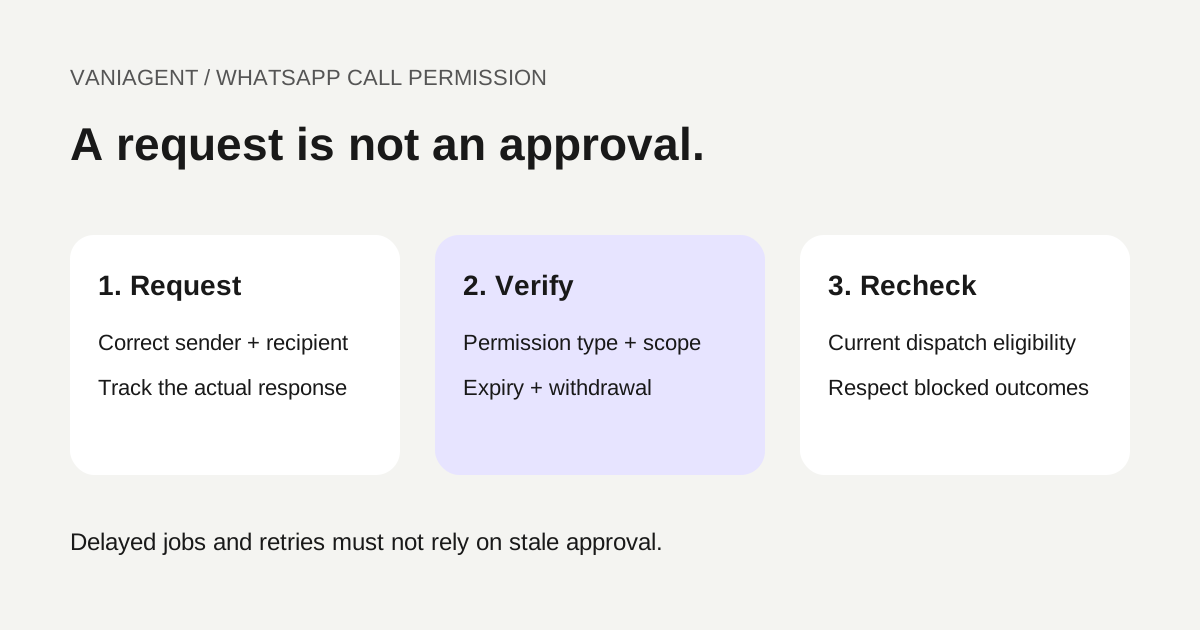
Before an AI agent places a business-initiated WhatsApp call, verify the current calling permission for the intended customer and business sender. A sent request is not approval, messaging permission is not calling permission, and a valid approval does not remove account, country or rate restrictions.
Build the permission check into call dispatch rather than leaving it as a note in the agent prompt. A scheduled job may outlive the approval, or the customer may change their choice before the call begins.
This guide provides a proposed state model, troubleshooting worksheet and acceptance checklist. It does not establish that a particular VaniAgent deployment supports WhatsApp calling. For channel compatibility, see WhatsApp Business Calling versus normal phone calls.
Separate calling permission from other checks
| Check | What it establishes |
|---|---|
| Customer identity | Whether the person or destination is correctly matched |
| Contact purpose | Whether this task and outreach are approved by the business |
| Messaging eligibility | Whether the intended message can be sent |
| Calling permission | Whether the required platform-recognized call approval applies |
| Sender and route eligibility | Whether this account and destination support the call |
| Rate and capacity availability | Whether the attempt can start under current limits |
Keep the checks separate in both data and reporting. A legitimate appointment request does not establish the technical state of calling permission. Conversely, a platform permission should not be treated as unlimited authorization for unrelated business outreach.
Current documented request and expiry rules
Twilio's WhatsApp Business Calling guide, checked on 16 October 2026, describes advance consumer approval for business-initiated calls. It lists permission-request limits of once per 24 hours and twice per seven days, and describes temporary permission and missed-call revocation conditions. Its callback flow also distinguishes temporary and permanent permission. Preserve that distinction instead of applying one expiry rule to every approval.
The same guide describes sender eligibility and country restrictions. These are provider-specific implementation references and can change. Confirm the current rules for your actual account before encoding limits or advertising availability.
Do not interpret the allowed maximum as a recommended contact frequency. Use the narrower of the platform allowance and the business's approved contact policy. A customer declining or withdrawing should lead to an appropriate suppression outcome, not attempts to find a different way to ring them.
Represent permission as a state with evidence
Maintain one record for the relevant sender–recipient relationship and task scope. Keep the source event, status time and expiry where provided. Do not infer approval from the absence of an error.
| Proposed state | Appropriate workflow behaviour |
|---|---|
| Unknown | Resolve current evidence; do not assume approval |
| Request pending | Await a supported customer response; do not call yet |
| Granted, applicable | Recheck remaining eligibility immediately before dispatch |
| Declined or revoked | Suppress the affected call under the approved policy |
| Expired | Do not call using the old approval |
| Uncertain or conflicting | Reconcile provider state or escalate |
These are application design labels, not guaranteed provider event names. Map them to the actual API and event semantics. A temporary approval needs an expiry; a permanent permission still needs applicable scope and withdrawal handling. Permanent should not mean immune to all later changes.
Trace the permission-request lifecycle
Create a logical request reference before submitting the permission message. Record the sender, recipient, intended purpose and provider result. Submission and delivery do not themselves establish customer approval.
When a supported response arrives, authenticate the event using the provider's documented mechanism and match it to the correct relationship. Handle duplicates without creating duplicate call jobs. Do not let a delayed older event silently overwrite a newer confirmed withdrawal.
If the event sequence is ambiguous, reconcile rather than guessing. Keep the case unresolved and visible to staff. Avoid treating conversational text such as “sure” as a substitute for the specific platform state required to initiate the call.
Recheck permission when the call actually starts
The scheduler should verify permission, sender configuration, task freshness and available limits as close to dispatch as the integration supports. A check made when a campaign list was imported can be stale by the time the call runs.
Reserve dispatch consistently so concurrent workers do not both initiate the same logical call. Keep a stable job identifier linked to the customer task and the provider call identifier. Do not promise exactly-once execution where the provider and integration cannot establish it.
If a request times out, determine whether the call was created before issuing another. An uncertain dispatch response is different from a definite permission rejection.
Use provider errors to select the recovery path
These Twilio examples were checked on 16 October 2026. Read the actual response and current documentation; another provider can expose different codes.
| Reference | Documented signal | Appropriate investigation |
|---|---|---|
| 37000 | Required consumer call permission not granted | Reconcile permission; do not blindly retry |
| 37006 | Maximum business-initiated calls to that number in the window reached | Review call counters and applicable window |
| 37010 | Permanent call permission already exists when requesting again | Verify existing permission rather than labelling refusal |
The 37006 reference describes five connected business-initiated calls within a rolling 24-hour period under its documented conditions. Track the supplier's qualifying units and events, not a calendar-day counter reset at midnight. Do not assume every failed dispatch consumes the same unit as a connected call.
For sender-not-enabled, unsupported-region or invalid-sender errors, repair eligibility or configuration. Repeated permission requests cannot fix those causes. Keep them distinct from customer denial in your incident report.
Example: an approved request becomes stale
Suppose a fictional customer approves a temporary callback for a specific enquiry. The business schedules the call, but the job is delayed beyond the approval's recorded expiry.
- The original approval is stored with its type, scope and expiry evidence.
- The job remains queued with no claim that the customer has been called.
- At dispatch, the current-state check finds the approval expired.
- The workflow suppresses the attempt instead of placing it against the old state.
- Staff or an approved automation evaluates the permitted next step, respecting request limits and the customer's preference.
Now consider a withdrawal before expiry. The same dispatch check should stop the job. A retry must not use an older cached approval just because the initial job was created while permission was valid.
This example describes expected application behaviour, not a measured outcome in any account.
Do not hide a rejected call behind another channel
If the customer wants another contact method, follow the separately approved process for that channel and verify its destination. Do not automatically place a telephone call because a WhatsApp call was rejected.
Messaging follow-ups have their own eligibility and template rules. Use the WhatsApp follow-up troubleshooting guide for message failures and the phone-to-WhatsApp context guide for maintaining the case without confusing permissions.
For live handoff, confirm the permitted endpoints before launch. A supported WhatsApp call should not be treated as evidence that an ordinary staff telephone bridge is available.
Test these permission and recovery cases
- No permission evidence: the system blocks dispatch.
- Request submitted but unanswered: no call is placed.
- Customer declines: the job is suppressed under policy.
- Temporary approval expires while a job is queued: dispatch revalidates and stops.
- Customer withdraws after scheduling: pending work does not use stale approval.
- Duplicate approval events: only one logical call job is created.
- Conflicting or out-of-order events: uncertain state is reconciled.
- Existing permanent permission: the request path handles the documented condition accurately.
- A rate or window limit is reached: the workflow does not loop on immediate retries.
- Sender configuration fails: staff see the technical cause separately from refusal.
Use fictional or authorized test participants and the intended account configuration. Inspect actual event, job and call records. A screen showing a sent permission message is insufficient evidence that the later call was eligible.
Keep a minimal audit worksheet
| Field | Why it is needed |
|---|---|
| Business sender and recipient references | Identifies the relationship covered |
| Purpose and case ID | Connects permission to the intended task |
| Request ID and provider message reference | Traces the request without storing unnecessary content |
| Permission type and state | Separates pending, temporary, permanent and withdrawn |
| Event time, expiry and evidence | Supports dispatch-time verification |
| Relevant call counters | Enforces the provider's applicable limits |
| Job and call identifiers | Detects duplicate or uncertain attempts |
| Rejection code and recovery decision | Explains why an attempt stopped |
Limit access and retention according to the business's approved policy. A monitoring dashboard should show missing evidence rather than turning unknown states into implied consent.
Monitor requests, approvals and calls separately
Report requests submitted, eligible approvals, calls dispatched, calls connected, permission rejections and unresolved states. Keep customer refusal separate from technical failures. An increase in approved requests does not establish useful completed conversations.
Review rejected cases before increasing retry frequency. The reliable system is one whose calls remain tied to current, applicable permission and whose blocked outcomes are visible and respected.
Frequently asked questions
Can an AI agent place a WhatsApp call after a customer agrees to messaging?
Messaging agreement is not sufficient evidence of the required calling permission. Verify the current provider-recognized calling state for the intended business sender and customer before initiating a business call.
Does sending a call-permission request authorize the call?
No. Treat request submission, message delivery and customer approval as separate states. A call should proceed only after the applicable permission and other eligibility checks pass.
Can WhatsApp calling permission expire?
Yes. Model the actual permission type and expiry supplied by the provider rather than using one permanent yes/no flag. Recheck the current state before dispatch, including delayed jobs and retries.
What does Twilio error 37000 mean?
Twilio documents 37000 as a business-initiated WhatsApp call without the necessary consumer permission. Inspect and resolve that permission state rather than repeatedly retrying the same rejected call.
What if the customer already granted permanent callback permission?
Verify the provider state and its scope before sending another request. Twilio documents a separate error for an existing permanent permission; do not treat that response as ordinary customer refusal or erase a valid state.
Can I switch to a normal phone call when WhatsApp rejects the call?
Only through a separately approved contact workflow with the appropriate destination and permission. A rejected WhatsApp attempt does not automatically authorize another channel or a live bridge.
Verify your permission workflow
Bring your proposed sender, permission-state design and callback use case to a scoped VaniAgent demonstration. Confirm supported calling features and test rejection recovery before enabling live outreach.
Put these ideas into production
Deploy AI voice agents in minutes and build outbound, inbound, and follow-up workflows on one platform.
Related Articles
WhatsApp Business Calling vs Normal Phone Calls: What Can You Connect?
Compare WhatsApp Business Calling and normal phone calls: supported routes, PSTN restrictions, calling permission, human handoff and buyer acceptance tests.
Why Did the WhatsApp Follow-Up Fail After an AI Call?
Troubleshoot WhatsApp follow-ups after AI calls with trigger checks, window and template validation, delivery evidence, safe retries and an incident worksheet.
How to Keep Customer Context When a Phone Call Continues on WhatsApp
Preserve customer context from phone calls to WhatsApp with verified identity, shared case records, messaging-window checks and reliable handoff recovery.
AI Voice Agent for WhatsApp and Phone Calls: Integration Guide
Plan an AI voice workflow across WhatsApp and regular phone calls. Learn channel options, context sharing, handoff, integrations, and how to test the complete journey before launch.